Interactive displays now appear everywhere we go—schools, conference rooms, retail stores, hospitals, and countless public spaces have all embraced them. When choosing one of these screens, the underlying touch technology matters more than you might expect. The decision between infrared and capacitive touch systems affects not just how the display performs day to day, but also how long it will last. Each approach comes with its own set of strengths and trade-offs. Understand what sets them apart makes it much easier to pick the right technology for your particular situation.
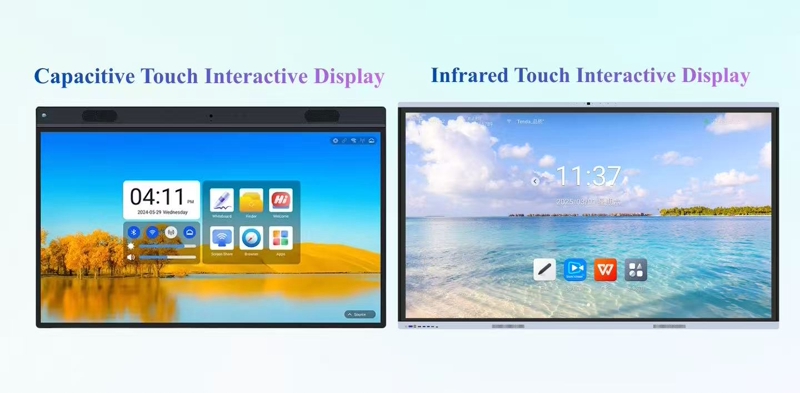
Infrared touch screens work by creating an invisible web of light across the surface of the display. Tiny infrared LEDs are built into the edges of the screen, constantly sending out beams of light to receptors on the opposite sides. This forms a kind of grid that hovers just above the glass. When someone touches the screen—whether with a finger, a stylus, or even while wearing gloves—that touch breaks one or more of these light beams. The system instantly figures out exactly where the interruption happened and translates it into a precise touch location.
Because there’s no need for a sensitive coating or moving parts on the screen itself, this type of technology is incredibly tough and long-lasting. It’s also highly responsive, with the ability to handle up to forty touches at the same time, which makes it especially useful for group work or interactive displays where more than one person might be using the screen at once.
Capacitive touch screens work by responding to the natural electrical properties of the human body. Beneath the surface of the glass lies a barely visible layer that helps create a steady electrostatic field. When a finger makes contact—since the body naturally conducts electricity—it causes a tiny shift in that field. The screen detects this change and immediately pinpoints where the touch happened.
This approach made modern smartphones and tablets possible, allowing for gestures like pinching to zoom or swiping with two fingers. It’s responsive, supports multiple touches at once, and has become the standard for everyday devices because it feels natural and works seamlessly.
| Performance Metric | Infrared Touch Technology | Capacitive Touch Technology |
| Response Time | Typically 6-20ms | Faster at 3-8ms |
| Touch Precision | Highly accurate with ±0.5mm tolerance | Exceptionally precise with <0.1mm accuracy |
| Multi-Touch Capability | Up to 40 points supported | Standard 10+ points with advanced controllers |
| Input Versatility | Works with any non-transparent object | Requires conductive materials like bare fingers |
| Light Transmission | Up to 88% without layers affecting clarity | 90-92% for high-contrast, sharp images |
The absence of a physical touch layer makes infrared screens particularly durable and easy to maintain. Since the sensors sit safely tucked away in the bezel rather than on the glass surface, the display resists scratches and cleans up quickly—a significant advantage for busy public kiosks where screens see constant use. This technology also offers remarkable input flexibility. You can interact using gloves, styluses, or practically any object, which proves especially valuable in industrial environments or cold weather conditions. Plus, infrared systems remain cost-effective even for large displays spanning up to 150 inches.
That said, they do have some sensitivities. Strong sunlight or accumulated dust can interfere with the sensors, and the necessary bezel frame might not suit designs seeking a completely seamless look.
In contrast, capacitive touch screens deliver superior visual clarity with high light transmission and support for 4K resolution, along with a responsive, smartphone-like user experience that enables fluid gestures. They also offer modern, bezel-less designs that enhance the premium appearance of high-end environments.
On the downside, capacitive touch screens are less suitable for wet or dusty conditions and may not function with gloves unless specially designed, while also being significantly more expensive for larger sizes and costly to replace if damaged.
| Application Scenario | Recommended Technology | Rationale |
| Education Classrooms | Infrared Touch | Supports multi-student collaboration with up to 40 touch points. Works well with styluses or gloves for winter classroom use. Durable against frequent cleaning. |
| Corporate Meeting Rooms | Capacitive Touch | Provides smartphone-like responsiveness for smooth presentations and annotations. Visual clarity ensures documents and presentations are easy to read. |
| Public Information Kiosks | Infrared Touch | Resistant to vandalism and harsh environmental conditions. Operates well with various input methods and requires minimal maintenance. |
| Retail Interactive Displays | Capacitive Touch | Enables fluid product exploration with pinch-to-zoom and smooth scrolling. Sleek design enhances customer brand experience. |
| Medical Environments | Infrared Touch | Compatible with gloves for sterile operation. Durable surface can withstand frequent disinfection without performance loss. |
| Outdoor Digital Signage | Specialized Capacitive | Ruggedized capacitive screens with optical bonding and anti-reflective coatings work best in sunlight. Requires precise engineering to maintain performance in challenging weather conditions. |
For shared environments like classrooms or training centers, infrared touch technology is often the more practical choice. It holds up well to frequent use, supports interaction from multiple people at once, and works with almost anything—a finger, a stylus, even a gloved hand. That kind of flexibility makes it a strong fit for collaborative settings where different people may be coming and going throughout the day.
Capacitive touch, on the other hand, shines when the focus is on image clarity and a polished, intuitive experience. It offers the same fluid responsiveness people are used to from their smartphones, which makes it especially well-suited for customer-facing setups or high-end meeting rooms where first impressions matter.
Taking the time to think through how the display will actually be used—along with the physical environment and budget—can go a long way toward choosing the right fit. If you’d like more details or help finding a solution tailo